Chrome DevTools ·
Edit and resend a request as fetch in Chrome DevTools
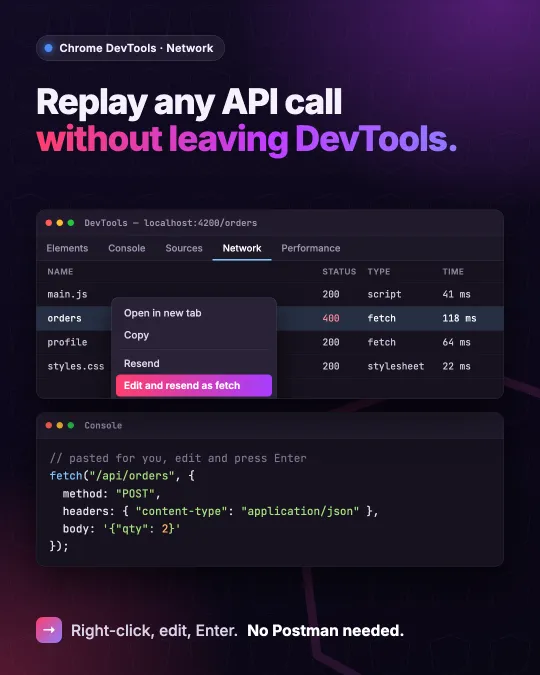
Resend a request in Chrome DevTools: right-click it in the Network panel, choose Edit and resend as fetch, change headers or body in the Console, then run it.
Chrome DevTools can turn any fetchable request in the Network panel into an editable fetch() call. Right-click the request, pick "Edit and resend as fetch", and DevTools switches to the Console with the fetch() expression already pasted into the prompt. According to the New in DevTools recap for Chrome 153 and Chrome 154, the pasted code also carries comments for the parameters and a link back to the original request. Change a header or the body, press Enter, and the request goes out again.
Why it beats an API client for quick checks
The usual alternative is copying the request into a separate API client and rebuilding its headers there. The Network reference says this option keeps the original request parameters and execution context, so the call runs in the same context as the original request instead of in a tool outside the browser.
In Angular work this fits a familiar kind of bug: a service sends the wrong payload, such as a field name that no longer matches the API. I can fix the body in the Console and read the server's answer before I touch the service. If the edited request works, the change to make in the code is already clear.
An edited call
DevTools adds its own comments and the reference link; I've left those out, and the endpoint below is an example. The only edit is in the body, where quantity now goes as a number instead of a string.
fetch("https://api.example.com/orders", {
  method: "POST",
  headers: { "content-type": "application/json" },
  body: '{"productId":42,"quantity":2}',
});
Copy as fetch still has its place
The Copy submenu in the same right-click menu still offers "Copy as fetch" and "Copy as fetch (Node.js)". Those put the call on the clipboard, which suits a test file or a script. When all I want is to send the request again with one change, Edit and resend skips that step.
Sources
- New in DevTools, October 2026 (Chrome 153 and 154)
- Network reference: edit and resend a request
- Network reference: copy a request
I post short notes like this on LinkedIn.