Angular 22.2 ·
Angular 22.2 can now catch misspelled output bindings
Angular 22.2 can fail the build when an event binding matches no output and no DOM event, like (valueChnage). How the option works and when to skip it.
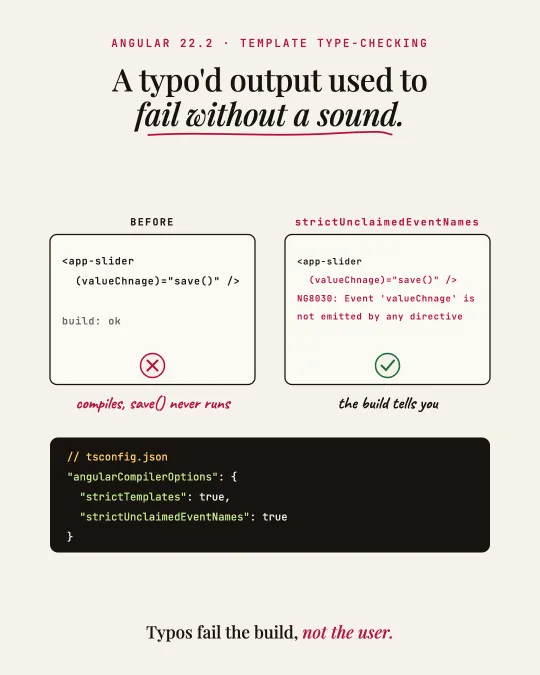
A typo in an output binding used to compile without a word. (valueChnage)="save()" on a component that emits valueChange type-checks fine, and save() never runs. You find out when someone reports that saving does nothing.
Angular 22.2 adds a compiler option for this. With strictUnclaimedEventNames on, the compiler reports an event binding whose name matches neither an output of a directive on that element nor a known native DOM event. The error code is NG8030.
// tsconfig.json
{
  "angularCompilerOptions": {
    "strictTemplates": true,
    "strictUnclaimedEventNames": true
  }
}
It is off by default, even with strictTemplates on, so nothing breaks when you upgrade.
What it checks and what it skips
The check is a heuristic, because the compiler cannot know every custom event that might bubble up from child elements. It only looks at elements that have a component or directive, and only at single-word camelCase names. Dash-case names like (my-event) are skipped, since custom events from child elements usually use that style.
Native DOM events are compared ignoring case, which covers vendor-prefixed names like webkitAnimationEnd. With CUSTOM_ELEMENTS_SCHEMA, elements without a matched Angular component are skipped as well.
When to leave it off
If your app listens to camelCase custom events on elements that also carry Angular directives, the option will report those bindings, and the Angular docs say not to enable it. For most apps I would turn it on: a typo becomes a build error instead of a silent bug in production.
Sources
I post short notes like this on LinkedIn.