Accessibility and AI agents ·
Your ARIA labels are agent UX now
AI browser agents read pages through the accessibility tree, like screen readers. What the Claude browser tool and the Chrome agent guide say, and what to fix.
AI browser agents read your page much like a screen reader does. Anthropic's browser use tool for Claude, generally available on the Claude API, works with a page "through its structure (the accessibility tree, elements, forms, and tabs)" as well as through screenshots and viewport coordinates. Chrome's agent-ready toolkit goes further: agents rely on the accessibility tree "as their primary data model".
What an agent cannot see
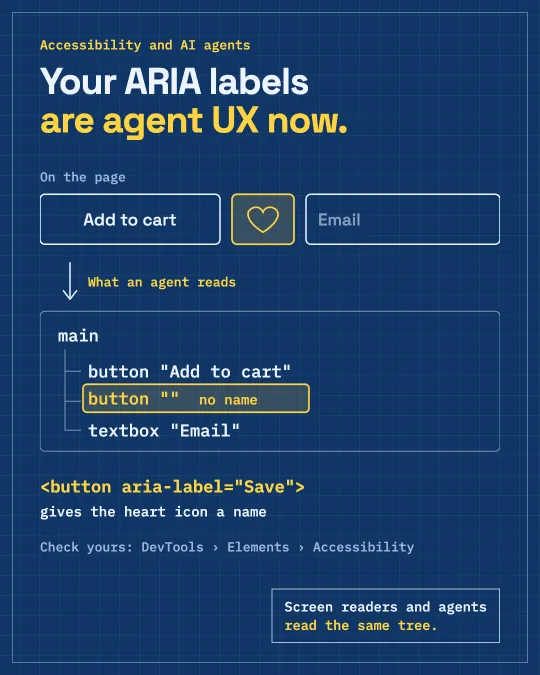
An icon-only button without a label shows up in the tree as a button with no name. A clickable div often does not show up as a button at all. An input without a label is a text box nobody can describe. The screenshot may still show the heart icon, but the structure the agent leans on has nothing to say about it.
The fixes are the old basics
<!-- icon-only button: give it a name -->
<button type="button" aria-label="Save to wishlist">
  <svg aria-hidden="true">…</svg>
</button>

<!-- inputs: a real label -->
<label for="email">Email</label>
<input id="email" type="email" />
Use real <button> and <a> elements instead of clickable divs, give icon-only buttons an aria-label, and connect every input to a <label>. Chrome checks the same things for agents: every interactive element needs a programmatic name, and the accessibility tree should be well-formed. Its Lighthouse "Agentic browsing" category is available from Chrome 150, and the score is informational.
Check what an agent sees
Open DevTools, select an element and look at the Accessibility pane. The computed role and name there are what assistive technology gets, and now agents too. In Angular, Angular Aria and the CDK take care of roles and keyboard behaviour, but the names are still yours to write.
Sources
I post short notes like this on LinkedIn.
Need help with this?